
Things I want to do
Run StableDiffusion from the command line using stable-diffusion.cpp.
It can run on both AMD GPUs and CPUs.
Environment setup
stable-diffusion.cpp
Download the appropriate Zip file for your environment from the following page.
If you want to run it on an AMD GPU, you need something with ‘vulkan’ or ‘rocm’ in its name.
(Basically, Vulkan should be fine. ROCM will likely have limitations on which GPUs can be used.)
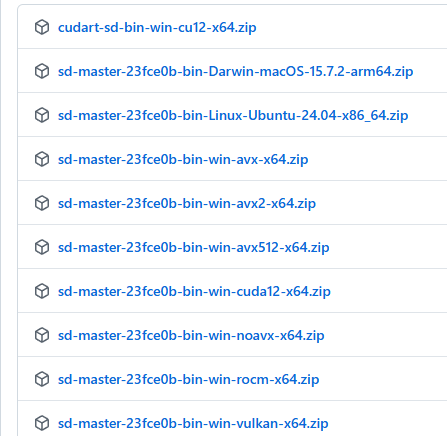
This applies to NVidia GPUs with ‘CUDA’ in their name.
AVX512, AVX2, AVX, and NOAVX are CPU-based. Please check which AVX version is compatible with your CPU and download it. (I was mistaken, but it seems AMD CPUs can also use AVX. It’s easiest to ask an AI which version is compatible.)
Once you’ve extracted the downloaded file to a folder of your choice, you’re ready to go.
Model
If you don’t have a StableDiffusion model locally, please download it using the following page as a reference. (You can save the model anywhere.)

execution
Launch the command line and navigate to the folder where you extracted stable-diffusion.cpp.
Execute the following command. (Replace the model path with the path to the model you are using.)
sd-cli -m Model path -p 'a lovely cat' -s -1
If a cat image is generated in ./output.png, the process was successful.
Options (arguments)
The options are summarized on the following page.
Only the most commonly used basic ones are listed below.
| -m | Model path |
| -p | prompt |
| -s | Seed value Specify -1 to generate randomly. Please note that if you do not specify a format, the same image will be generated every time. |
-H | Image height |
| -IN | Image width |
--foot | VAE path |
--steps | Step. Initial value: 20 Note that for some models, a lower number may be better. |
Operation check
We have confirmed that it works with the following models.
- bluePencilXL_v700.safetensors
- v1-5-pruned-emaonly.safetensors
Execution speed
The image generation speed is as follows: (This does not include model loading time or time after iteration.)
| CreationTime(s) | |
| CPU(StableDiffusionWebui) | 263 |
| GPU(StableDiffusionWebui) | 63 |
| CPU(stable-diffusion.cpp AVX2) | 249 |
| GPU(stable-diffusion.cpp Vulkan) | 36 |
reference
コメント