
Things I want to do
In Unity development, UI elements on the Canvas system can sometimes hijack input events (clicks) for game objects beneath them. As a result, game objects may become unclickable. (This is particularly frustrating for users when the UI is semi-transparent.) This article presents a standard solution to this problem.
Solution
By changing the UI settings, events will be ignored. As a result, events can be passed to the object below. This setting can be changed from either the UI or the code.
UI support
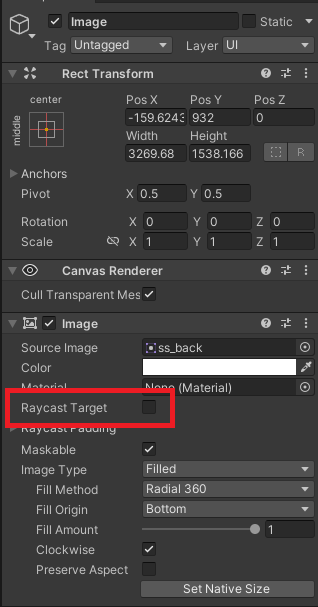
By unchecking the Raycast Target option in the corresponding UI’s Image component, the UI will ignore mouse events.
Code implementation
Setting Image.raycastTarget to false will cause the UI to ignore mouse events.
The following is an example of setting raycastTarget to false in the code attached to the target UI.
GetComponent<Image>().raycastTarget = false;
コメント