
Things I want to do
The CSV file on the server is converted to JSON on the client side and used there.
The library used is node-csvtojson. Node.js must be installed.
Since all data will be downloaded to the client, please consider alternative methods if you are dealing with sensitive data such as user information or large amounts of data.
Prepare
Install csvtojson by running the following command in the project root directory.
npm and csvtojson
implementation
The implementation is as follows:
import csv from "csvtojson"

const convertCsv2Json = (txt) => {
  csv().fromString(txt).then(
    csv_data => {
      console.log(csv_data);
    }
  )
}

const fetchSetting = async (url) => {
  fetch(url).then(res => res.text().then(txt => convertCsv2Json(txt)));
}

fetchSetting("/setting.csv")
The `fetchSetting` function downloads a CSV file, and then calls `convertCsv2Json`. (The argument `/setting.csv` is the URL of the CSV file; please change it as needed.)
convertCsv2Json converts downloaded CSV files into JSON.
The data converted to JSON can be used as `csv_data` in the following function.
    csv_data => {
      console.log(csv_data);
    }
Japanese characters may appear garbled. Please save the CSV file in UTF-8 format.
Example
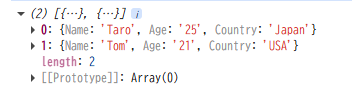
Here are examples of input CSV and output JSON.
The first line is treated as the title.
/setting.csv
Name,Age,Country
Taro,25,Japan
Tom,21,USA
csv_data
Other output methods
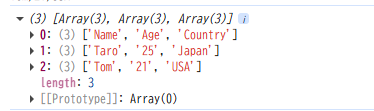
You can change the output by passing arguments to the csv() function.
csv({ noheader: true, output: ‘csv’ })
With this setting, the first row is also treated as data, and the data is saved as an array.
/setting.csv
Name,Age,Country
Taro,25,Japan
Tom,21,USA
csv_data
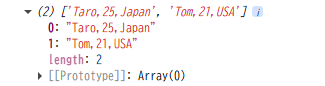
csv({ output: ‘line’ })
With this setting, the data will be saved as a single string.
/setting.csv
Name,Age,Country
Taro,25,Japan
Tom,21,USA
csv_data

コメント