
Things I want to do
When I turn on code highlighting on a Cocoon page, formatted text other than code is also highlighted. I don’t want the formatted text to be highlighted.
On this site, I wanted to display the folder structure as pre-formatted text, but it ended up looking strange with added color.
ROOT
|   dice.glb
|   index.html
|
\---js
    +---libs
    |       3d.js
    |       GLTFLoader.js
    |       three.module.js
    |
    \---utils
            BufferGeometryUtils.js
Something like this.
Change in Cocoon settings
Highlight source code
First, let’s configure the settings to highlight source code.
From the WordPress admin screen, go to ‘Cocoon Settings’ → ‘Code’ tab → check ‘Highlight source code’ and click ‘Save Changes’.
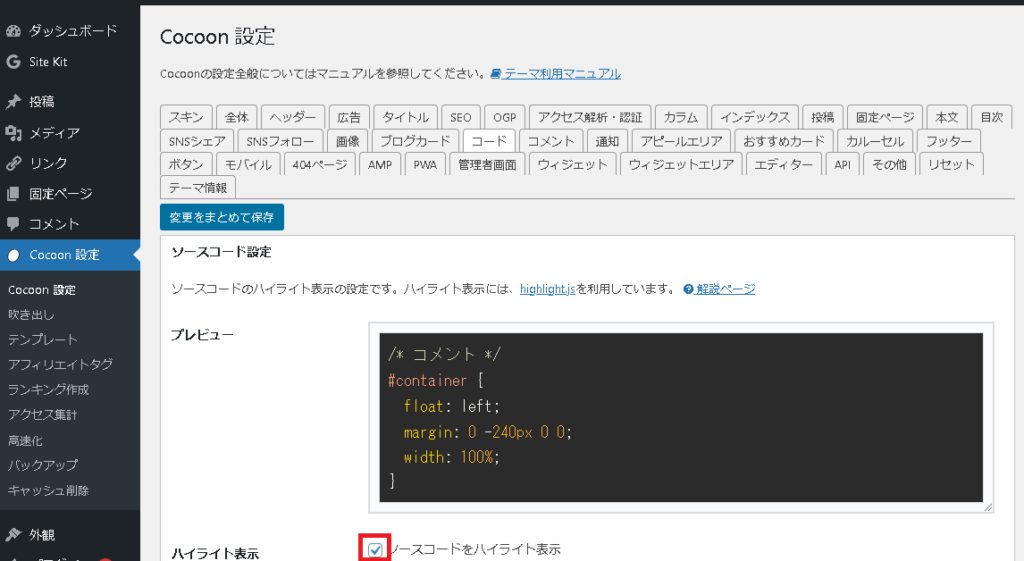
This setting will highlight the code, but it will also highlight other formatted text and poems.
If you delve a little deeper, it seems that all content with the `
` tag will be highlighted.
Narrow down the highlighting target
To solve the above problem, we will adjust the settings to narrow down the target of the highlighting.
Go to the same ‘Cocoon Settings’ → ‘Code’ tab as above, and change the ‘CSS selectors to highlight’ at the bottom of the page as follows.
.entry-content pre.wp-block-codeNotes (initial values)
.entry-content preArticle creation
The settings are now complete, so let’s create the article.
If you add code Use blocks to fill it in.
If you are displaying something other than code Use blocks to fill it in.
Result
The block will be highlighted as follows:
for (int i = 0 i < 10 ; i++)The block will not be highlighted as follows:
for (int i = 0 i < 10 ; i++)
As shown above, the code is different from the one that highlights background colors and other elements. If you want to change this, you can do so by setting a style for the ‘wp-block-preformatted’ class.

コメント