
Things I want to do
Inkscape can create SVG files, but they contain Inkscape-specific data and are larger than regular SVG files. They may also contain absolute file paths and potentially include usernames.
While using SVG for Inkscape is convenient during development, it’s best to remove it before release.
This article introduces a batch file (bat) that removes Inkscape-specific data from SVG files within a folder.
To improve work efficiency, I’m overwriting the original file.
Please be sure to back up your files so that you can restore them to their original state.
batch
Create a file named svg.bat with the following content and save it in the folder where the SVG file you want to convert is located.
If Inkscape is not installed in ‘C:\Program Files\Inkscape’, please change the installation location.
setlocal enableDelayedExpansion

set "TARGET_DIR=."
set "FILE_PATTERN=*.svg"

for %%f in ("%TARGET_DIR%\%FILE_PATTERN%") do (
    "C:\Program Files\Inkscape\bin\inkscapecom" "%%~f" --export-plain-svg  --export-filename="%%~f"
)

pause
endlocal
The executable file for the Inkscape GUI is named ‘inkscape,’ but the executable file for the CLI is named ‘inkscapecom.’
The syntax –export-plain-svg=’output file’ does not work.
The output file is specified with –export-filename.
Result
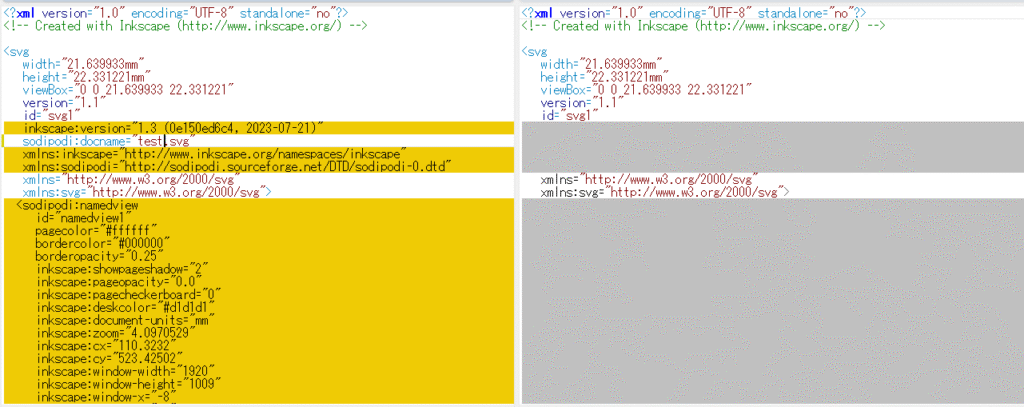
I was able to remove Inkscape-specific data from the SVG using a batch file.
Comparing the files before and after the batch file reveals that the information for Inkscape has been removed, as shown below.

コメント