
Things I want to do
Build a web server in Python without writing a single line of code.
For reasons I will explain later, please only use this in secure locations such as within a LAN.
How to start
Download and install Python from the following page.
Open a command prompt, navigate to the folder you want to use as the server’s root directory, and execute the following command.
python -m http.serverThe HTTP server has now started.
From the browserhttp://localhost:8000/You can access the running server by going to ‘http://ipadress:8000’.
Things that can and cannot be done
This summarizes what you can and cannot do with a running web server.
What you can do
File list and download
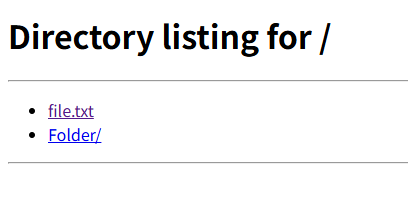
If there is no index.html (or index.htm) in the folder where the server startup command was executed,http://localhost:8000/Accessing this will display a list of folders and files.
Clicking on a folder will move you through that folder, and clicking on a file will allow you to download it (or view its contents depending on the file type).
Of course, you can directly access files and folders by entering the path in the URL.
HTML display
When you select an HTML file from your browser, it will be displayed as HTML (although the server is simply returning HTML).
Additionally, if an index.html (or index.htm) file exists when displaying a folder, index.html (or index.htm) will be displayed.
Specifying the port
You can specify the port number after http.server in the startup command.
example:Specify port 8001
python -m http.server 8001On Windows, you can also specify Port 80.
Regarding CGI
Specifying `–cgi` as a startup argument enables the use of CGI. (Note that the language used for CGI is Python.)
However, it has been explicitly stated that CGI will be removed in version 3.15. Considering the future, I personally think it’s best not to use it too much.
Things that cannot be done
Use of HTTPS
It appears that HTTPS is not supported. Therefore, please use it only in secure locations such as within a LAN.
DELETE/PUT
You cannot directly manipulate files on the server using the DELETE/PUT methods.
Result
I was able to start the server using Python.
This is a simple system that doesn’t store data or files on a server, and it seems easy to use in limited environments such as within a LAN.
Memo
Location of the server (http.server) code
Python installation folder\Lib\http\server.py
example:
C:\Users\Username\AppData\Local\Programs\Python\Python310\Lib\http
Websites I used as references


コメント