
Things I want to do
We will use Google’s Gemini API with NodeJS to generate music.
The implementation will be front-end only; the back-end will use Google.
You will need to obtain a Google API key.
Notice:As of the time of writing this article, Gemini’s music generation is a preview function. Specifications and other details may change in the future.
This article describes a client-side implementation using NodeJS.
However, this method is not recommended by Google because it could potentially expose the API key to the user.
Please limit use to personal use or experiments.
This article is primarily based on the following page.
However, the JavaScript example on the page below is incorrect and does not work at the time of writing.

License of the generated music
The understanding is that the creator holds the copyright to the generated music and is responsible for its use.
The source is on the following page. Please check for the latest version before using it.
Prepare
Creating an API key
Access the following page to obtain your API key.

Project creation
Create a folder to use for the project.
Open the command prompt and run the following command in the folder you created to create a Vite project.
npm init vite@latestAt the time of writing this article, the Vite version was 6.3.5.
If you want to match the settings, please specify the version.
You will be asked for the name of the project you want to create, so enter it.
(In this article, we used the term ‘music.’)

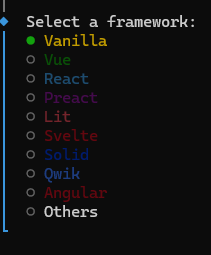
You will be asked which framework to use, so select Vanilla.
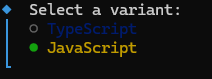
Next, select JavaScript as the language.
The project creation is now complete.
Library Installation
Once the project creation is complete, install the necessary libraries.
cd Gemini
npm install @google/genai
npm install
That completes the preparation.
Code modification
Example correction
As mentioned above, the example on the official page does not work.
The corrected code is as follows. Please change the apiKey to the one you issued. (It needs to be loaded from HTML to work.)
weightedPrompts: [{ text: ‘piano solo, slow’, weight: 1.0 }]The prompt ‘ piano solo, slow’ on the line marked with a comma is the prompt. Please change it to whatever you like.
However, although `musicGenerationConfig` is the setting, changing it didn’t seem to affect the generated music. (I couldn’t tell if it wasn’t working at all, or if the code was wrong.)
postscript:
The settings in musicGenerationConfig seem correct. (I wasn’t sure if the most straightforward setting, BPM, was working, but settings like onlyBassAndDrums did. Also, the prompt seems to take precedence over these settings. This might be due to weight.)
Incidentally, the official documentation states that the function for updating is session.reset_context(), but this is also incorrect; the correct function is session.resetContext().
import { GoogleGenAI } from '@google/genai';

const ai = new GoogleGenAI({
  apiKey: "API Key", // Do not store your API client-side!
  apiVersion: 'v1alpha',
});

const session = await ai.live.music.connect({
  model: 'models/lyria-realtime-exp',
  callbacks: {
    onmessage: async (e) => {
      console.log(e)
    },
    onerror: (error) => {
      console.error('music session error:', error);
    },
    onclose: () => {
      console.log('Lyria RealTime stream closed.');
    }
  }
});

await session.setWeightedPrompts({
  weightedPrompts: [{ text: 'piano solo, slow', weight: 1.0 }],
});
await session.setMusicGenerationConfig({
  musicGenerationConfig: {
    bpm: 200,
    temperature: 1.0
  },
});

await session.play();
Use of generated music
The generated music will be sent to the following callback.
    onmessage: async (e) => {
      console.log(e)
    },
I was able to make the music play by referring to the following page.
However, since I wasn’t sure about the licensing terms of the code I used as a reference, I’ve refrained from including the code itself.

The process is as follows:
- e.serverContent.audioChunks[0]Convert .data (base64) to binary (int16)
- Convert binary data (int16) to float32 and create an AudioBuffer.
- Set the created AudioBuffer to AudioBufferSourceNode and play it.
troubleshooting
Here’s a bulleted list of the things I got stuck on.
- Since the music created in a single event is short (1-2 seconds), you need to participate in several events to create music of a reasonable length.
- The first event that comes with an onmessage is a Setup event and does not include music.
- Music is generated endlessly, with no end. (There is no end to the song.)
- The music wouldn’t play without user interaction. (We addressed this by displaying a button once music generation was complete, and clicking the button would start the music.)
- Vite build errors/errors in older browsers may be caused by using `await` at the top level. To resolve the build errors, you’ll need to modify the code or change settings, and if you want it to work in older browsers, you’ll need to modify the code again.
Result
I was able to generate music using the Gemini API.
Websites I used as references

コメント