
Things I want to do
When attempting to automatically download a model using methods like `from_pretrained`, you may encounter the following error and be unable to download it.
Cannot access gated repo for url https://huggingface.co/ モデルパス.
Access to model モデルパス is restricted. You must have access to it and be authenticated to access it. Please log in.
Specific example:
Cannot access gated repo for url https://huggingface.co/stabilityai/stable-audio-open-1.0/resolve/main/model_index.json.
Access to model stabilityai/stable-audio-open-1.0 is restricted. You must have access to it and be authenticated to access it. Please log in.
This article will explain how to deal with the above error.
countermeasure
Remove the part after ‘resolve’ in the URL where the error was displayed, and then download the file you were trying to download (in the example above).https://huggingface.co/stabilityai/stable-audio-open-1.0/resolve/main/model_index.jsonDelete `resolve/main/model_index.json` from your system, then go to `https://huggingface.co/stabilityai/stable-audio-open-1.0/`, navigate to ‘Files and versions’, and click on `model_index.json` to check if you can download it. (Just make sure it starts; it doesn’t need to complete.)
If you encounter a 401/403 error and the download fails, please refer to the article below to resolve the issue and enable downloading.
If you get a 404 error, it’s highly likely that the code is incorrect (it doesn’t match the current model’s path), so you should check the source code.

Once you’ve confirmed that you can download it using your browser, access the following website.

Click ‘+ Create New token’ (top right of the page).

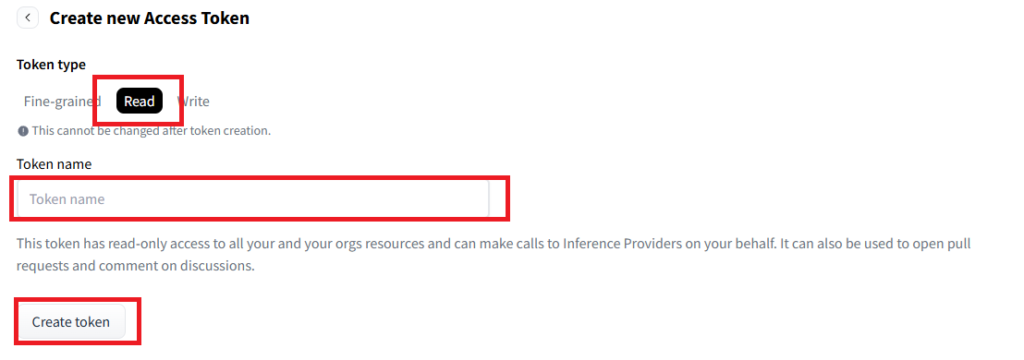
Select Read, enter a name for the token, and click Create token.
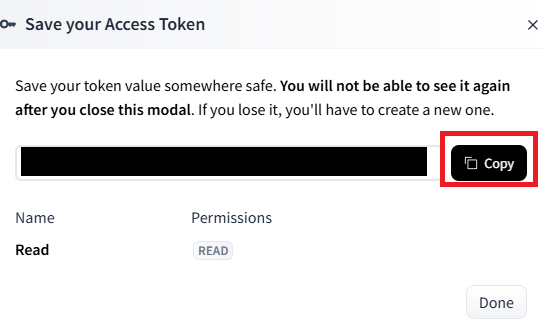
A token will be displayed (actually, it’s displayed in the blacked-out area below), so click Copy.
Execute the following command in the terminal (command prompt) where you will run the code.
huggingface-cli loginWhen you see ‘Enter your token (input will not be visible):’, right-click and paste the token you copied above.
If you have copied other things, such as the command above, please copy the Token again.
The text won’t appear if you right-click and paste. Please right-click and then immediately press Return.
You will be asked ‘Add token as git credential? (Y/n)’, so enter n.
After confirming that no errors are displayed, rerun the script that failed to download.
Result
I was able to download the model that failed to download using `from_pretrained`.
コメント