
Things I want to do
This captures a screen capture (snapshot) of the screen displayed in Phaser3.
background
I tried to get the Canvas element and then the Image, but I couldn’t get the 2D Context, so I looked for another method.
implementation
Call the following function in any scene.
this.game.renderer.snapshotArea(x, y, width, height, callback);x and y are coordinates from the top left corner of the display area.
(The red area in the diagram below is the area to be captured.)
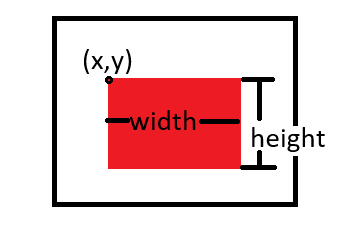
The argument for the callback is an Image element.
As an example, set the following function as a callback.
(A screenshot of the screen displayed in Phaser3 is shown at the bottom of the HTML.)
(image) =>{
    document.body.append(image)
}Result
I was able to output the screen displayed on Phaser3 as an image.
The image format is PNG. (This can be changed.)
Websites I used as references

Snapshot - Notes of Phaser 3
rexrainbow.github.io

コメント