
Things I want to do
The following article uses buttons set from the Inspector.
However, since the button is not used within the class after the callback is set, there is no need to have it as a member, and for someone accustomed to writing code, setting up the button using a GUI is cumbersome. (Even looking at the code, it’s difficult to tell which button is set.)
Here’s how to get a button from code.

Previous code
In the article above, I wrote the following code.
The m_Button is being configured in the Inspector.
using System.Collections;
using System.Collections.Generic;

using UnityEngine;
using UnityEngine.UI;

public class Example : MonoBehaviour
{
    public Button m_Button;

    void Start()
    {
        m_Button.onClick.AddListener(() => ButtonClicked(42));//register function
    }
    void ButtonClicked(int buttonNo)////argument type can be changed
    {
        Debug.Log("Button clicked = " + buttonNo);///Output log
        /*process by click*/
    }
}implementation
The following changes will be made:
Remove member variable m_Button
You can get the GameObject using GameObject.Find(‘ButtonName’).
‘ButtonName’ is the name you set in the Inspector.
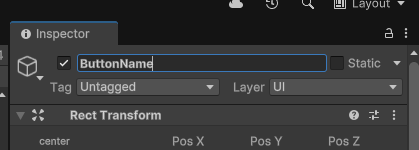
This retrieves the button component from the GameObject. This component can be accessed by calling `ok_btn.onClick.AddListener`, just like a button configured externally.
public class Example : MonoBehaviour
{
    void Start()
    {
        Button ok_btn = GameObject.Find("ButtonName").GetComponent<Button>();
        ok_btn.onClick.AddListener(() => ButtonClicked(42));
    }
    void ButtonClicked(int buttonNo)////argument type can be changed
    {
        Debug.Log("Button clicked = " + buttonNo);////Output log
        /*process by click*/
    }
}Side note
You can obtain not only Button instances but also other instances.
For RawImage, it’s as follows: RawImage_Nane is the name set in the Inspector, just like with Button.
GameObject.Find("RawImage‗Name").GetComponent<RawImage>();Result
I was able to obtain the Button and set up a callback using only the script, without having to configure the Button from the Inspector.
コメント