
Things I want to do
This will allow you to perform a specified action when a button is pressed in Unity.
When I searched, I found quite a few articles in Japanese (probably about Unity20XX), but I couldn’t get it to work, either because I was doing it wrong or because it doesn’t work with Unity6.
This explains how to do it in a Unity 6 environment.
implementation
Code Registration
Select Create Empty from the + in the Hierarchy to create an empty GameObject.
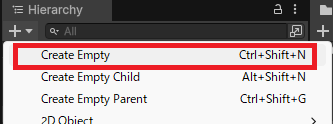
Select the empty game object you created in the Hierarchy view and display the Inspector.
Select Add Component at the bottom of the Inspector view, then select New Script and give it a name of your choice.
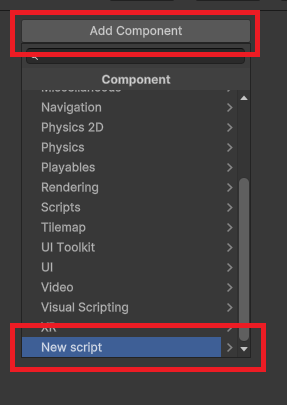
Modify the script you created as follows and save it.
using System.Collections;
using System.Collections.Generic;

using UnityEngine;
using UnityEngine.UI;

public class Example : MonoBehaviour
{
    public Button m_Button;

    void Start()
    {
        m_Button.onClick.AddListener(() => ButtonClicked(42));//register function
    }
    void ButtonClicked(int buttonNo)////argument type can be changed
    {
        Debug.Log("Button clicked = " + buttonNo);///output log
        /*クリック時の処理*/
    }
}
Creating and registering buttons
Create a canvas by selecting UI → Canvas from the + menu in the Hierarchy view. (This step is unnecessary if you already have one.)
Next, create a button by selecting UI → Button – TextMeshPro from the + in the Hierarchy view.
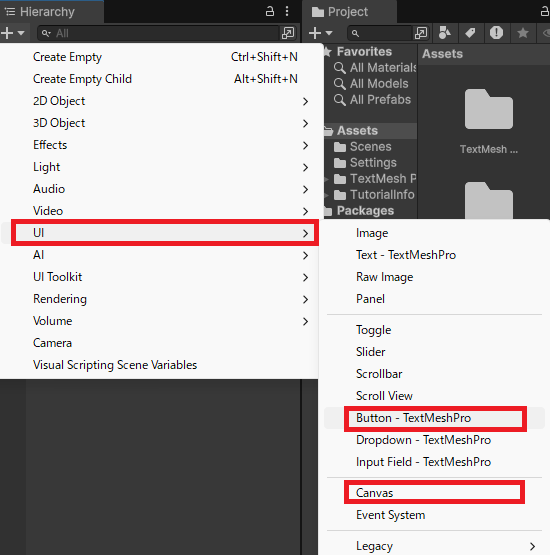
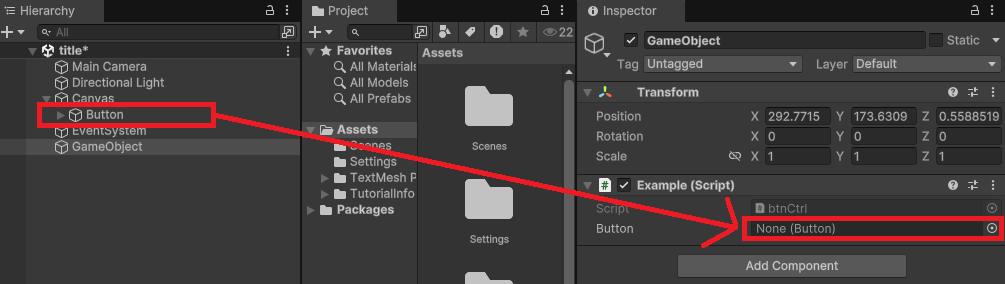
Select the empty GameObject in the Hierarchy view where you registered the code above.
Drag and drop the button you created from the Hierarchy view onto the Button displayed in the GameObject’s Script.
Result
When I ran the program and pressed the button, logs were output to the Console view.
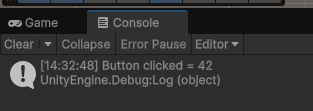
The website I referenced (the official site) also describes other methods for registering functions. Here, I’ve tried and described the most general method used in this example. If you’re interested in other methods, please check the link below.
Websites I used as references


コメント