
Things I want to do
As explained in the article below, you can save glTF (.glb) files in Blender, but if the shape is complex, the file size will increase, and loading times will be slow when opening it on the web.
This section explains how to reduce the size of saved glTF (.glb) files.
Environment
Blender:3.4.1
Changing mesh export settings
To display the export dialog, go to ‘File’ in the upper left corner → ‘Export’ → glTF 2.0 (.glb/.gltf).
In the save dialog, uncheck the ‘Normals’ option in the ‘Mesh’ group and save.
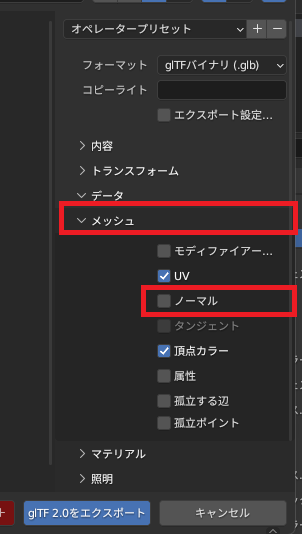
By changing the settings as described above, you can reduce the save size.
Compression export settings
To display the export dialog, go to ‘File’ in the upper left corner → ‘Export’ → glTF 2.0 (.glb/.gltf).
Check the ‘Compress’ option in the save dialog and save.
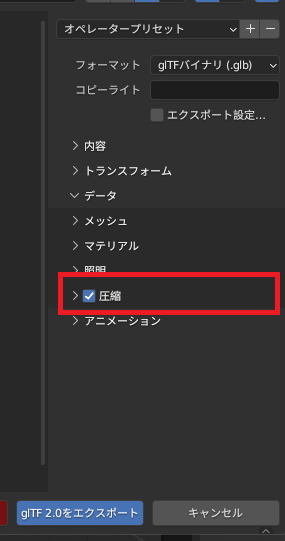
By changing the settings as described above, you can reduce the save size.
However, please note that if you save the file using this method, it will not be readable by Threejs in the implementation described below.
The following steps are also required to read a compressed glTF file.

Result
By changing the mesh export settings and the compression export settings, we were able to reduce the size of the output glTF file.
The save size for each setting is summarized below.
| Normal save | compression | Size (kbyte) | remarks |
| 〇 | × | 786 | Default settings |
| × | × | 220 | |
| 〇 | 〇 | 106 | |
| × | 〇 | 30 |
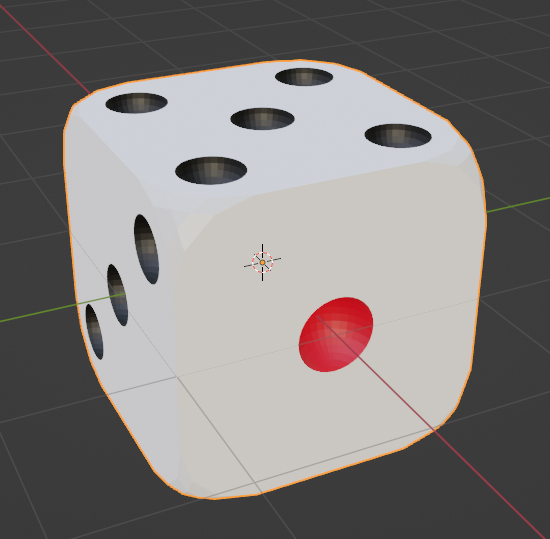
The model used is the following die.
Websites I used as references
Related pages
A summary of how to load and display 3D objects created in Blender using Threejs.
コメント