
Things I want to do
Moved from FC2 HP to a custom domain.
I want to transfer files from each page to the same directory and file.
Redirect using .htaccess
Edit the .htaccess file to configure the transfer. This file should be automatically created in the top-level folder when you create an account on FC2 Homepage.
However, in FC2’s file manager, you cannot edit files by right-clicking, as shown below. (The same applies to the old file manager.)
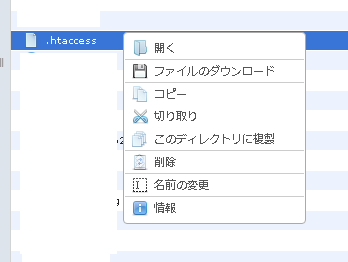
However, while you cannot edit the file from the file manager, it is not write-protected, and file operations are still possible.
You can update your .htaccess file using the following method.
- Overwrite via FTP
- Rename the file to .htaccess.
This time, I’ll show you how to rename a file to .htaccess using only a file manager.
Editing .htaccess
Open the file manager and navigate to the folder where you want to update the .htaccess file. (This can be done with older file managers as well, but we will explain the procedure using the new file manager.)
Make a copy of the .htaccess file to create a backup.
Delete the .htaccess file.
Click the ‘Create File’ icon in the upper left corner of the file manager to create a new file. (You can leave the name as the default newfile.html. Changing the file extension may prevent you from editing the file.)

Right-click the file you created and select ‘Edit in Source’ to edit it.
Once you’ve finished editing, save the file, right-click, select ‘Rename,’ and change the name to .htaccess.
You have now successfully created an .htaccess file with your desired content.
Contents of .htaccess
To redirect from an FC2 homepage to another domain, the .htaccess file should look like this:
Enter your FC2 account as the source. Enter the URL of your new website as the destination. (You will need to change the www.com part to match your new website.)
RewriteEngine On
RewriteCond %{http_host} ^[source].web.fc2.com
RewriteRule ^(.*) https://www.[Destination].com/$1 [R=301,L]
Result
Accessing ‘source.web.fc2.com’ will now redirect you to ‘www.destination.com’.
Also, accessing ‘source.web.fc2.com/sub/’ will redirect you to ‘www.destination.com/sub/’.
Accessing ‘source.web.fc2.com/sub/2.html’ will redirect you to ‘www.destination.com/sub/2.html’.
Other options
Transferring using JavaScript requires embedding it on each page, which is cumbersome. If each page needs to redirect to the destination page, even more code is needed (though you might be able to find a solution).
Websites I used as references


コメント