
Things I want to do
Change the compression ratio of a large number of JPEG files all at once.
While there are web services and tools that can convert dozens of images at once, this time we will convert hundreds to thousands of images at once.
Compression using cjpeg
It compresses using cjpeg, which is included in mozjpeg.
cjpeg is a command-line program that modifies the compression ratio of a single JPEG image. It creates a batch file to modify the compression ratio of multiple JPEG files.
Download cjpeg
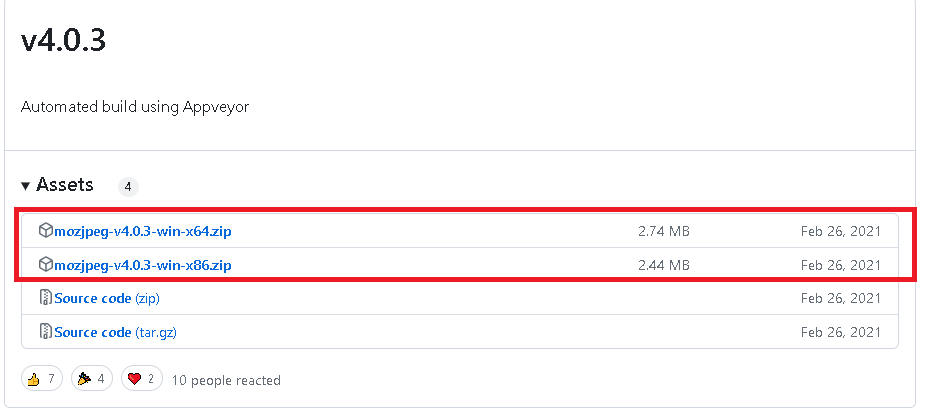
Open Assets from the top of the page below and find the links to mozjpeg-Vx.xx-win-x64.zip and mozjpeg-Vx.xx-win-x86.zip. (At the time of writing this article, the version is V4.0.3)
Download either mozjpeg-Vx.xx-win-x64.zip or mozjpeg-Vx.xx-win-x86.zip depending on your operating system.
Installing cjpeg
Extract the downloaded zip file to a folder of your choice.
cjpeg.exe is located in the following folder.
\shared\Release
Creating a batch file
Create a batch file that runs cjpeg on all .Jpg files in a folder.
Create the following in Notepad and save it as cjpeg.bat.
mkdir 'output'
for %%A in (*.jpg) do (
echo %%A
'Extracted folder\shared\Release\cjpeg.exe' -optimize -quality 90 -outfile 'output\%%A' '%%A'
)
The extracted files will be changed to the folder where the zip file was extracted.
-The ’90’ in quality 90 refers to the JPEG quality. Change it if necessary. (A value between 0 and 100; 100 is the highest quality.)
Executing a batch file
Copy cjpeg.bat to the folder containing the JPEG files you want to convert, then double-click to run it.
Result
An ‘output’ folder was created in the folder where the bat file was executed, and a file with the same name but with a modified compression ratio was saved inside that folder.

コメント