
Things I want to do
Images generated with Stable Diffusion may appear blurry or have low contrast.
Here are two ways to improve the situation.
Use of VAE
The first method is to use VAE.
For instructions on installing and using VAE, please refer to the following article.

Recommended VAE
As mentioned in the article above, I will introduce two of the same VAEs here as well.
Using these VAEs to generate images may improve image quality.
General-purpose VAE
This is a VAE (Value-Added Engineering) developed by stability ai (the developer of Stable Diffusion).
It can be used with both live-action and anime-style models.
You can download it from ‘vae-ft-mse-840000-ema-pruned.ckpt’ on the following page.
VAE for anime images
This is a VAE for anime images.
You can download it from ‘kl-f8-anime.ckpt’ on the following page.
example
vae-ft-mse-840000-ema-pruned
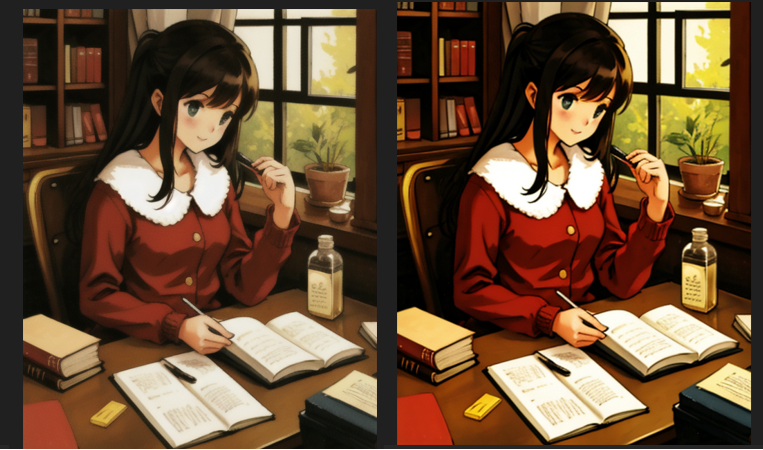
This is an example using ‘vae-ft-mse-840000-ema-pruned’.
The image on the left was generated without VAE, and the image on the right was generated using vae-ft-mse-840000-ema-pruned.
You can see that the image on the right has higher contrast and is clearer.
kl-f8-anime
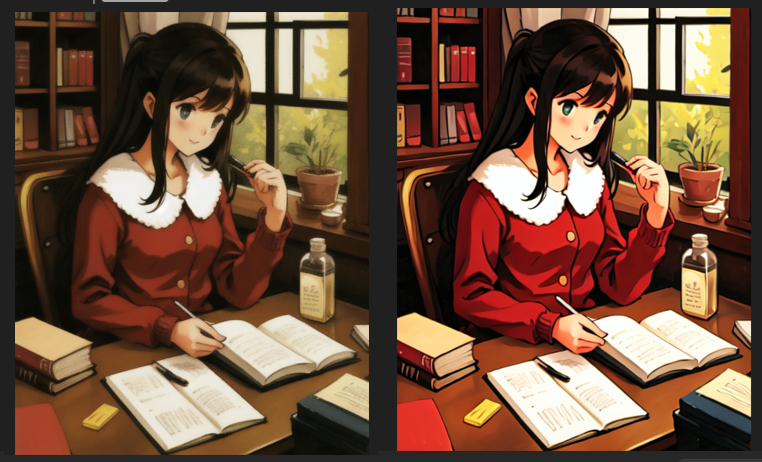
This is an example using ‘kl-f8-anime’.
The image on the left is generated without VAE, and the image on the right is generated using kl-f8-anime.
You can see that the image on the right has higher contrast and is clearer.
It appears to have higher contrast than vae-ft-mse-840000-ema-pruned.
(I think this is because kl-f8-anime is a VAE designed for anime-style images.)
others
Will VAE work with AMD GPUs (DirectML)?
It depends on the item.
The two VAEs introduced on this page are functional.
However, VAEs using formats such as fp8_e4m3fn are highly likely to not work.
Use of Hires.fix
The second method is to use Hires.fix to increase the image resolution and make the image clearer.
How to use
Check the box for Hires.fix to enable it.
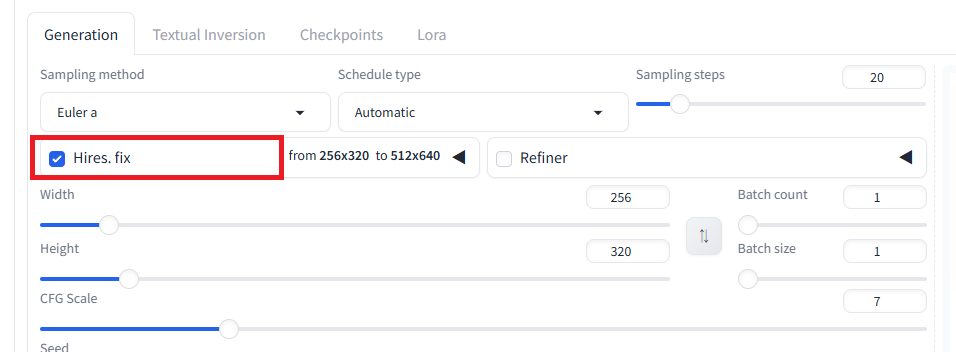
By default, an image enlarged to twice its original size is generated.
If necessary, resize the image using an external application (such as Paint).
Generating twice the number of images requires a considerable amount of memory.
While you can reduce the width/height to decrease memory usage, some models may not be able to generate images properly when width/height is reduced.
Hires.fix does not simply enlarge the original image cleanly. Therefore, it may generate an unintended image (an image different from the one generated without Hires.fix). In that case, you can reduce the Denoising strength value to generate an image closer to the original.
example
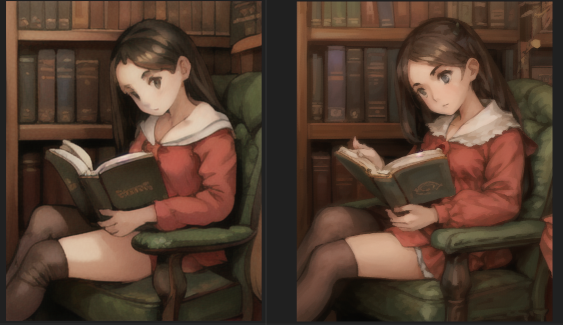
The image on the left shows the result without Hires.fix, and the image on the right shows the result with Hires.fix.
The image has changed quite a bit (Denoising strength = 0.3), but you can see that the image on the right is sharper.
Result
Stable Diffusion allowed us to generate clearer/higher-contrast images.
コメント