
Things I want to do
In Phaser3, you can register click events to a GameObject and use it as a button.
However, with GameObjects, it’s difficult to create elaborate buttons other than using images with simple shapes like rectangles and circles.
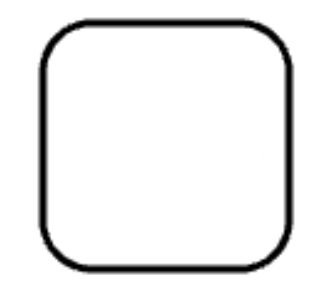
Here, we’ll use the graphics object to create an elaborate (overly rounded) button.
code
I created the following function.
function createRoundedRectangle(scene, x, y, width, height, radius, fill, stroke, strokeThickness) {
    const graphics = scene.add.graphics();

    graphics.fillStyle(fill);
    graphics.lineStyle(strokeThickness, stroke);

    graphics.beginPath();
    graphics.moveTo(x + radius, y);
    graphics.lineTo(x + width - radius, y);
    graphics.arc(x + width - radius, y + radius, radius, Math.PI * 1.5, 0, false);
    graphics.lineTo(x + width, y + height - radius);
    graphics.arc(x + width - radius, y + height - radius, radius, 0, Math.PI * 0.5, false);
    graphics.lineTo(x + radius, y + height);
    graphics.arc(x + radius, y + height - radius, radius, Math.PI * 0.5, Math.PI, false);
    graphics.lineTo(x, y + radius);
    graphics.arc(x + radius, y + radius, radius, Math.PI, Math.PI * 1.5, false);
    graphics.closePath();
    graphics.fillPath();
    graphics.strokePath();


    graphics.setInteractive(new Phaser.Geom.Rectangle(x, y, width, height), Phaser.Geom.Rectangle.Contains);
    return graphics;
  }
Please note that calling graphics.setInteractive without arguments, as you would with other objects, will not work.
call
The above function is called from within the Scene class as follows:
let x = 100;
let y = 200;
let font_size = 10;
let fill_color  =  0xffffff ;
let stroke_color = 0x000000;
let strokeThickness = 3;
let func = () =>{alert()};

createRoundedRectangle(this, x, y, width, height, radius, fill_color, stroke_color, strokeThickness).on('pointerup', func);Result
I was able to create an elaborate button without using any images.
However, this function does not display strings, so if you want to display text, you will need to do so separately.

コメント