
Things I want to do
I’ll try using Matter in Phaser 3 to use the physics engine with complex shapes.
Data preparation
Prepare the image
Please prepare the image as a PNG file.

For this example, I created the image above. It’s hard to see, but the white areas are transparent.
I named it c.png. The size is 100×100 pixels.
implementation
Loading images
The above image is loaded using the scene’s preload method.
    preload ()
    {
        this.load.image('c', 'assets/c.png');
    }
Add image
Add the above image when creating the scene.
    create ()
    {
        const poly = this.add.image(300, 300, 'c');
Domain settings
We will now set the collision detection area for the image added above.
        const chevron = '0 0 ' +     //①の(x,y)
                        '100 0 ' +    //②の(x,y)
                        '100 100 ' +      //③の(x,y)
                        '80 100 ' +       //④の(x,y)
                        '80 20 ' +        //⑤の(x,y)
                        '20 20 ' +        //⑥の(x,y)
                        '20 100 ' +       //⑦の(x,y)
                        '0 100 ' +        //⑧の(x,y)
                        '0 0';            //⑨の(x,y)(1個目と同じ)
        this.matter.add.gameObject(poly, { shape: { type: 'fromVerts', verts: chevron, flagInternal: true } });
Set the string to xy in the order shown in Figures ① to ⑨ below, separated by spaces.
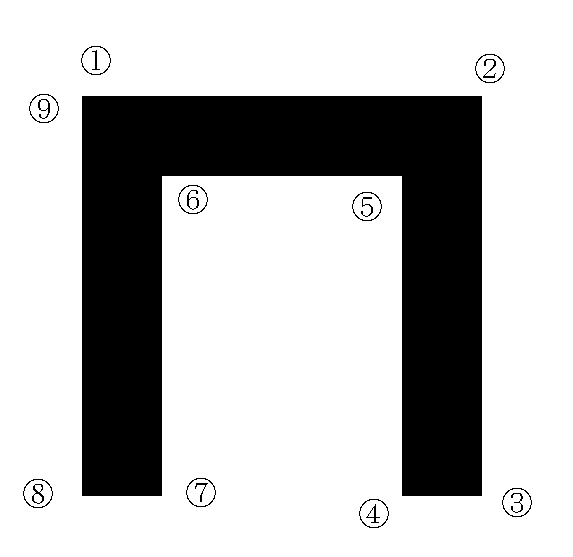
The `matter.add.gameObject` method is used to link an image (poly) with a sequence of points (chevron).
Result
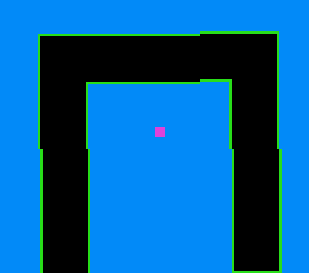
We were able to set up collision detection as follows:
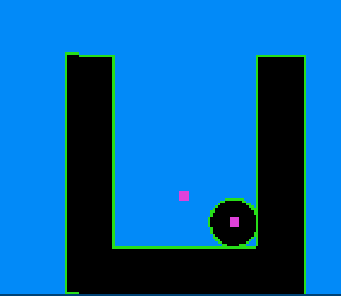
It’s also possible to rotate it 180 degrees and insert a different object.

コメント