
Things I want to do
This creates a Vite environment that uses Phaser 3 (a 2D game engine using Javascript).
This assumes that the environment in which Vite can run (such as Node.js) is already installed.
Using a template
Fortunately, a Vite template that uses Phaser 3 is available, so we will use that.
Get the template
Obtain the template using one of the following methods:
Clone from repository
Clone it from the following link.
(If you’re wondering what a clone is, please try downloading the zip file below.)
Once the cloning is complete, copy everything except the .git folder to your project folder.
Download as a Zip file
Access the following page.
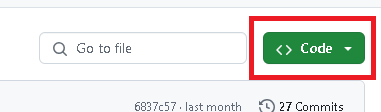
Click on ‘Code’ located near the top center of the screen.
Click ‘Download zip’.
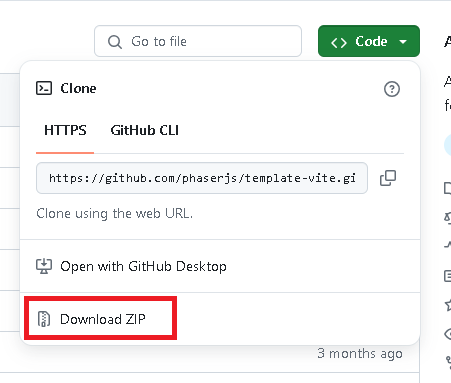
Once the download is complete, extract the contents of the `template-vite-main` folder from the zip file into your project folder.
Project Initialization
Open Visual Studio Code and then open the project folder from the ‘Open Folder…’ option in the File menu.
Execute the following command from the Visual Studio Code Terminal (if it’s not displayed, select Terminal from the View menu).
npm installThat completes the preparation.
The process to bundle
Code modification
The code is located in the Src folder, so we will modify it there.
Startup of the test server
Execute the following command in the terminal:
npm run devThis template uses a fixed port of 8080.
bundle
Execute the following command in the terminal:
npm run buildThe bundled files are saved in the dist folder.
Checking bundled files (additional information)
Updating the configuration file
Open package.json.
Add the following line to the Scripts section and save it.
    "scripts": {
        "dev": "vite --config vite/config.dev.mjs",
        "build": "vite build --config vite/config.prod.mjs",
        "preview": "vite preview "
    },
execution
Execute the following from the terminal:
npm run previewThe URL will be displayed as shown below, and when you open it in your browser, it will display using the bundled files.
➜ Local: http://localhost:4173/Result
I was able to create a Vite environment using Phaser 3.

コメント