
Things I want to do
If you want to move a 3D model in sync with music/audio, you would likely create keyframes while listening to the sound on the timeline.
However, if your PC’s specifications are insufficient or if the FPS is high, the sound and preview may not be synchronized.
We will address the issue of synchronization failure, as it prevents the creation of keyframes at the correct timing.
Environment
Blender:3.4.1
Sink settings
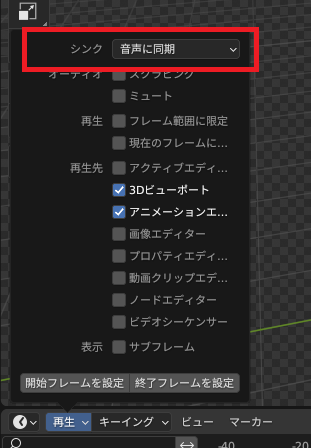
Open the timeline and then open the playback menu.
Change the top sync setting to ‘Synchronize with audio.’ (The default setting is playback every frame.)
Result
When playing back on the timeline, the 3D viewport and audio are now synchronized.
However, some 3D elements will not be rendered, so you will need to check each frame if necessary.

コメント