
Things I want to do
We will set up a StableDiffusion environment on a local PC (Windows) where CUDA is running.
background
This blog takes a challenging approach, such as getting StableDiffusion to work with AMD GPUs, but setting up a CUDA-enabled PC is easy. However, for some reason, other pages use a slightly more complicated method (installing Git and Python, etc.).
Here, I will introduce the simplest method possible.
Article for environments where CUDA does not work
AMD GPU(DirectML)

CPU
Environment setup
download
The following page will open.
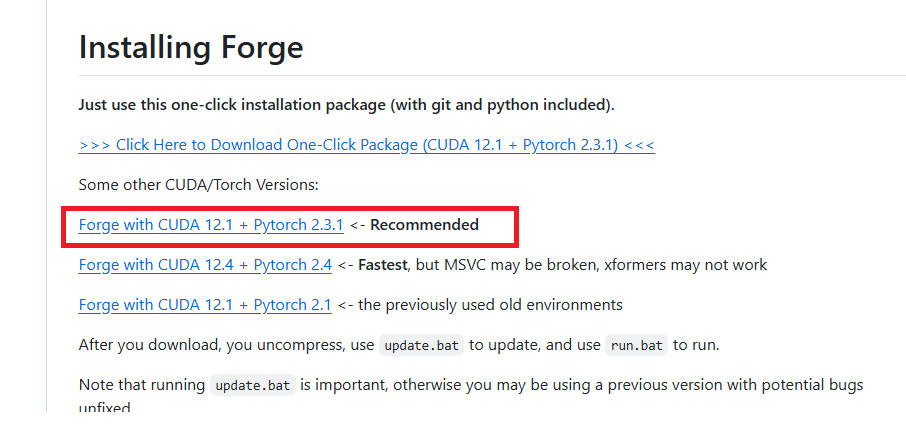
Scroll down the page to find the ‘Installing Forge’ section, and click on the recommended binary to download it.
Development
Extract the downloaded zip file to a folder of your choice.
Model Installation
It appears that stable-diffusion-webui-forge does not have the models installed initially.
Install the model by following the instructions in the article below.
execution
Run the run.bat file located in the extracted folder.
If you encounter the following error during execution (processing will continue), execute the `git config~` command displayed. This error may reappear. If it appears again, execute the command again. (The folder path in the argument should have changed.)

If your browser launches and the GUI is displayed as shown below, then it was successful.

Result
I was able to create the image by entering the prompts in the displayed GUI and clicking Generate.
TroubleShooting
Different driver versions
If you encounter an error indicating that the driver version is incorrect (or not installed), please install the correct driver version from the following page.

Runtime error (Input type (float) and bias type (struct c10::Half) should be the same)
If you encounter the error ‘Input type (float) and bias type (struct c10::Half) should be the same’ during image generation, take the following steps.
The webui-user.bat file is saved in the installation folder\webui; open it.
Find and modify the following line, then restart StableDiffusion.
Before:
set COMMANDLINE_ARGS=
After:
set COMMANDLINE_ARGS=--no-half
Runtime error (memory)
If the GUI is displayed but image generation fails, it is highly likely that there is insufficient memory (VRAM). (Even if there is no memory-related error message, it may still be a memory problem.)
Please try the following improvement methods.
Reduce the size of the generated image.
Please reduce the width and height of the generated image.
However, if the image is too small, a decent image will not be generated. (It’s best not to make it smaller than 512×512.)
Fix for startup options
The webui-user.bat file is saved in the installation folder\webui; open it.
Find and modify the following line, then restart StableDiffusion.
Before:
set COMMANDLINE_ARGS=
After:
set COMMANDLINE_ARGS=--lowvram
コメント