
Things I want to do
Unity has a version control system called Unity Version Control, but I’ll use Git, which I’m more familiar with, for version control.
I will omit the basic usage of Git.
How to manage
Create a repository
The repository is created locally or on the server using the usual method.
Project creation and first commit
Use UnityHub to create a Unity project in any folder of your choice.
Download the Unity.gitignore file from the page below.
Rename the downloaded Unity.gitignore file to .gitignore and save it in the project’s root directory.
Clone the repository you created into a suitable folder (not the project folder).
Move the .git folder created within the folder to the project root.
Once you have completed the above steps, you can push/commit.
If you are prompted to run `git config –global –add safe.directory` when trying to push/commit (or run a diff), please refer to the article below.

Use the cloned environment
Use an environment where you have committed using the method described above on another PC.
Cloning is the same as with any other project.
Launch Unity Hub and click Add → Add Project from disk in the upper right corner.
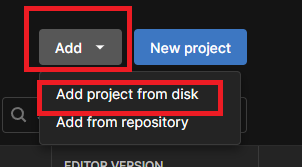
A dialog box will appear allowing you to select a folder. Open the cloned folder and click ‘Add Project’.
The selected folders will be listed.
When you launch a listed project, libraries and other necessary components will be prepared, allowing you to start the application. (This will take a considerable amount of time the first time you launch it.)
Notice
Even after editing and running a Scene in the Unity Editor, the Scene is not saved.
Remember to save your scene before pushing.
If a Scene in the Hierarchy has an asterisk (*) next to it, it means there is unsaved information.
結果
Unity projects can now be managed with Git.
bonus
File size
Unity projects have ridiculously large file sizes, so I wanted to see what the file size would be like when managed by Git. (This is a project I had on hand that had undergone some development.)
| File size | |
| Entire project | 1.91Gbyte |
| .git folder | 46.1Mbyte |
| Management file | 138Mbyte |
You can see that only a very limited number of files are managed for the entire project. (Incidentally, the Library is the largest file that is not managed.)
コメント