
Things I want to do
Here are two ways to embed YouTube videos into a web page.
How to specify a video using Src in an iframe
The first method is to specify the video using the `Src` attribute in the iframe.
This is what is usually meant by embedding a YouTube video.
Embedding method
Obtained from the code video
You can obtain the HTML code by right-clicking on a YouTube video and selecting ‘Copy embed code’ from the menu that appears.
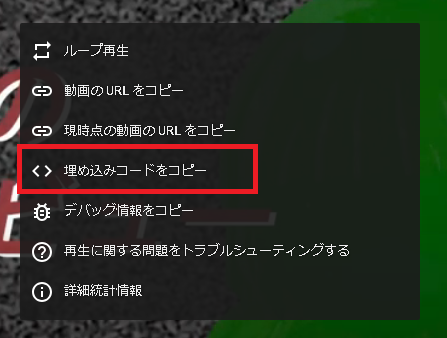
The following code is generated:
<iframe width="1033" height="581" src="https://www.youtube.com/embed/WnZnm7NI4rQ" title="不居実まるの初動画" frameborder="0" allow="accelerometer; autoplay; clipboard-write; encrypted-media; gyroscope; picture-in-picture; web-share" allowfullscreen></iframe>You can also change the video that is played by manually changing the ID part of the src attribute (WnZnm7NI4rQ above) and the Title part (Fukyo Maru’s First Video above).
Embedding in WordPress
In the case of WordPress, you can embed a YouTube video by pasting the YouTube address (e.g., https://www.youtube.com/watch?v=WnZnm7NI4rQ&t=4s) at the beginning of the paragraph.
Of course, you can also embed videos from YouTube’s block list.
Embedding using the YouTube Player API
The second method is embedding using the YouTube Player API.

As explained on the page above, the examples are a bit difficult to use (the very first example cannot be used as is), so I will introduce an edited version that is easier to use.
Implementation method
The code is as follows:
html
<!DOCTYPE html>
<html lang="ja">
<head>
    <meta charset="UTF-8">
    <title>動画埋め込み</title>
</head>
<body>
  <div id="player"></div>
  <script src="youtube.js"></script>
</body>
</html>
youtube.js
let tag = document.createElement('script');

tag.src = "https://www.youtube.com/iframe_api";
let player_element = document.getElementById('player')
player_element.parentNode.insertBefore(tag, player_element);

var player;
function onYouTubeIframeAPIReady() {
    player = new YT.Player('player', {
        height: '360',
        width: '640',
        videoId: 'WnZnm7NI4rQ',
    });
}
You can change the video being played by modifying the Javascript videoId (WnZnm7NI4rQ above).
merit
While embedding using the YouTube Player API might seem like a cumbersome process at first glance, it does have its advantages.
That means you can control the video player from Javascript.
For example, you can create a special control panel for embedded videos using JavaScript.
(I haven’t tested it, but it might be possible to manipulate the video by specifying the video using the `Src` attribute in the iframe and then retrieving the Video tag from within the iframe. However, this won’t work locally due to browser policies. The fact that this method works locally is a significant advantage.)

コメント