
Things I want to do
I will use SVG in Unity.
My research suggests installing Vector Graphics using the Package Manager, but in my environment (2021.3.4411 Personal), Vector Graphics did not appear in the Package Manager.
This article explains how to install Vector Graphics without using the Package Manager and how to use it with Canvas.
install
Open Packages/manifest.json in your Unity project.
Add the following line to the dependencies block:
'com.unity.vectorgraphics': '2.0.0-preview.12',
Example: (Bold text added)
{
  'dependencies': {
    'com.unity.vectorgraphics': '2.0.0-preview.12',
    'com.unity.collab-proxy': '2.5.1',
    'com.unity.feature.2d': '2.0.1',
    'com.unity.ide.rider': '3.0.31',
    'com.unity.ide.visualstudio': '2.0.22
It will be installed automatically when you activate the Unity Editor.
Display SVG in UI
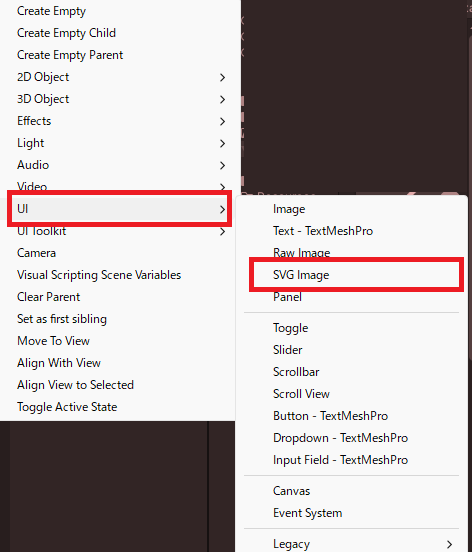
Add it by going to the Hierarchy’s + button, then UI → SVG Image.
Open the Inspector of the added SVG Image and add a Canvas renderer from ‘Add Component’.
In my environment, the program wouldn’t work without adding this, resulting in a runtime error.
Loading and specifying SVG images
SVG files can be saved in any folder within the Assets folder, or imported by dragging and dropping them into the Assets folder of your Unity project.
Specify the imported SVG to the created SVG image using the following steps.
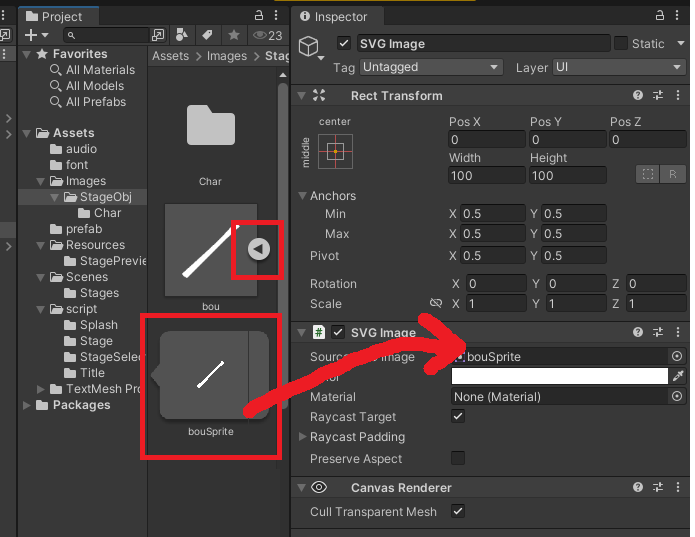
1. In the project tab, click the triangle next to the imported SVG to display the Sprite.
2. Drag and drop the displayed Sprite (the large red square in the image below) into the Source SVG image field of the SVG Image.
others
SVG images can be displayed on buttons, panels, and other components by adding an SVG image from the Add Component menu.
However, please note that you need to remove the Image Component beforehand in order to add an SVG image.

コメント