
Things I want to do
We will run a tutorial game for Phaser3, a 2D game creation engine.
Also, since the original is in English, I will leave comments in Japanese whenever possible.
Running the tutorial game
Download source code
Download the source code (phaser3-tutorial-src.zip) from the following page.
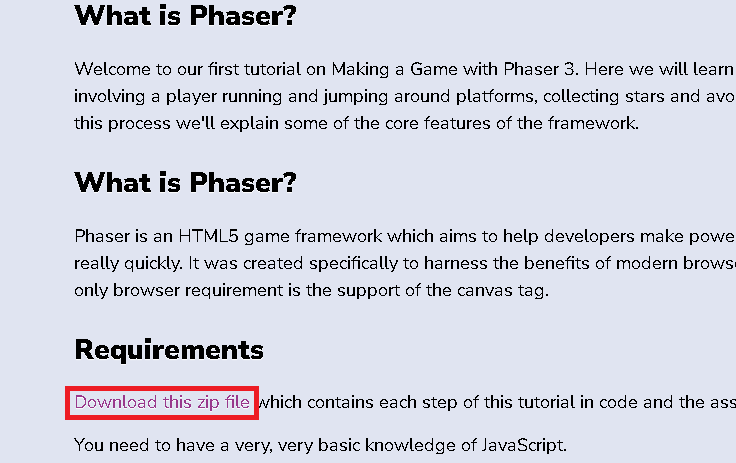
It’s a little hard to find, but in the ‘Requiements’ section there’s a link that says ‘Download this zip file’.
Execution of source code
Extract phaser3-tutorial-src.zip to a location of your choice.
Here, we’ll start it using the Visual Studio Code Live Server.
The game will not run if you double-click the HTML file or load it directly from your browser.
(This is because it causes an error when reading external files.)
For details on installation instructions and more, please refer to the following page.

Launch Visual Studio Code, select ‘Open Folder’ from the File menu, and open the folder where you extracted the Zip file (the folder containing part1.html).
Open the HTML file you want to run, and click ‘Go live’ in the lower right corner of the Visual Studio Code screen.
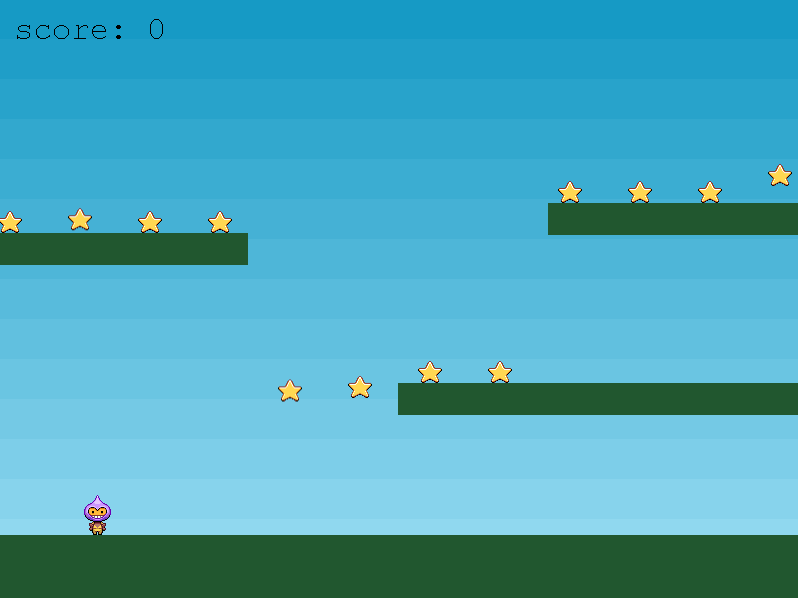
By selecting Part10.html and clicking ‘Go live,’ the game launched in Chrome as shown below.
Comments on the tutorial game
The explanation is quite detailed in English, but I will leave as many comments as possible in Japanese.
The relevant code is from Part 10 of the completed project. (If you have some programming experience, you should be able to create a decent game just by reading this.)
<!doctype html>
<html lang="en">
<head>
    <meta charset="UTF-8" />
    <title>Making your first Phaser 3 Game - Part 10</title>
    <script src="//cdn.jsdelivr.net/npm/phaser@3.11.0/dist/phaser.js"></script><!-- cdnからPhaser.jsを読み込む -->
    <style type="text/css">
        body {
            margin: 0;
        }
    </style>
</head>
<body>

<script type="text/javascript">

var config = {
    type: Phaser.AUTO,
    width: 800,                     ////ゲームの幅
    height: 600,                    ////ゲームの高さ
    physics: {
        default: 'arcade',          ////当たり判定の設定
        arcade: {
            gravity: { y: 300 },    ////重力の設定 下方向に300
            debug: false
        }
    },
    scene: {
        preload: preload,            ////シーンロード前に呼び出さされる関数
        create: create,              ////シーン作成時に呼び出さされる関数(別のシーンから対象のシーン移動された際は再度呼び出される)
        update: update               ////シーン表示中に呼び出さされる関数
    }
};

var player;           ////プレイヤーオブジェクト
var stars;            ////星オブジェクト
var bombs;            ////爆弾オブジェクト
var platforms;        ////地面オブジェクト
var cursors;          ////入力イベントオブジェクト
var score = 0;        ////スコア
var gameOver = false; ////ゲームオーバーかどうか
var scoreText;        ////スコアの文字列

var game = new Phaser.Game(config); ////ゲーム作成

function preload () ////シーンロード前に呼び出さされる関数(Configで指定)
{
    this.load.image('sky', 'assets/sky.png');//// 名前”sky”でassets/sky.pngを読込
    this.load.image('ground', 'assets/platform.png');//// 名前”ground”でassets/platform.pngを読込
    this.load.image('star', 'assets/star.png');//// 名前”star”でassets/star.pngを読込
    this.load.image('bomb', 'assets/bomb.png');//// 名前”bomb”でassets/bomb.pngを読込
    this.load.spritesheet('dude', 'assets/dude.png', { frameWidth: 32, frameHeight: 48 });//// 名前”dude”でassets/dude.pngをspritesheetとして読込dude.pngを幅32ごとに1枚の画像として扱える
}

function create ()
{
    //  A simple background for our game
    this.add.image(400, 300, 'sky');//画像Skyを画面真ん中に表示(指定座標に画像の中心がくるように表示)

    //  The platforms group contains the ground and the 2 ledges we can jump on
    platforms = this.physics.add.staticGroup();//地面グループ作成

    //  Here we create the ground.
    //  Scale it to fit the width of the game (the original sprite is 400x32 in size)
    platforms.create(400, 568, 'ground').setScale(2).refreshBody();//地面作成 (画像を2倍に拡大。拡大する場合は.refreshBody()が必要)

    //  Now let's create some ledges
    platforms.create(600, 400, 'ground');//ブロック作成
    platforms.create(50, 250, 'ground');//ブロック作成
    platforms.create(750, 220, 'ground');//ブロック作成

    // The player and its settings
    player = this.physics.add.sprite(100, 450, 'dude');//プレイヤー作成

    //  Player physics properties. Give the little guy a slight bounce.
    player.setBounce(0.2);///プレイヤーが地面に着いたときにバウンドする。値を大きくするとバウンド量が増える
    player.setCollideWorldBounds(true);//画面端から出れないようにする

    //  Our player animations, turning, walking left and walking right.
    this.anims.create({////左移動時のアニメーション
        key: 'left',
        frames: this.anims.generateFrameNumbers('dude', { start: 0, end: 3 }),////Splite”dude”の0-3
        frameRate: 10,
        repeat: -1
    });

    this.anims.create({////停止時のアニメーション
        key: 'turn',
        frames: [ { key: 'dude', frame: 4 } ],
        frameRate: 20
    });

    this.anims.create({////右移動時のアニメーション
        key: 'right',
        frames: this.anims.generateFrameNumbers('dude', { start: 5, end: 8 }),////Splite”dude”の5-5
        frameRate: 10,
        repeat: -1
    });

    //  Input Events
    cursors = this.input.keyboard.createCursorKeys();////キーボード入力のイベント作成

    //  Some stars to collect, 12 in total, evenly spaced 70 pixels apart along the x axis
    stars = this.physics.add.group({//星作成
        key: 'star',
        repeat: 11,                   //11個
        setXY: { x: 12, y: 0, stepX: 70 }///x70ごと
    });

    stars.children.iterate(function (child) {///星一個づつに拮抗

        //  Give each star a slightly different bounce
        child.setBounceY(Phaser.Math.FloatBetween(0.4, 0.8));///バウンドを0.4から0.8の間でランダムで指定

    });

    bombs = this.physics.add.group();///爆弾グループ作成

    //  The score
    scoreText = this.add.text(16, 16, 'score: 0', { fontSize: '32px', fill: '#000' });///スコアの表示作成(初期化)

    //  Collide the player and the stars with the platforms
    this.physics.add.collider(player, platforms);///プレイヤーと地面がぶつかるように設定
    this.physics.add.collider(stars, platforms);///星と地面がぶつかるように設定
    this.physics.add.collider(bombs, platforms);///爆弾と地面がぶつかるように設定

    //  Checks to see if the player overlaps with any of the stars, if he does call the collectStar function
    this.physics.add.overlap(player, stars, collectStar, null, this);///星とプレイヤーがぶつかった場合にcollectStarを呼ぶように設定

    this.physics.add.collider(player, bombs, hitBomb, null, this);///爆弾とプレイヤーがぶつかった場合にhitBombを呼ぶように設定
}

function update ()//シーン表示中に定期的に呼ばれる
{
    if (gameOver)//ゲームオーバー中はなにもしない
    {
        return;
    }

    if (cursors.left.isDown)//左キー入力
    {
        player.setVelocityX(-160); //左方向に速度

        player.anims.play('left', true);//"left"のアニメーション再生
    }
    else if (cursors.right.isDown)//右キー入力
    {
        player.setVelocityX(160); //右方向に速度

        player.anims.play('right', true);//"right"のアニメーション再生
    }
    else
    {
        player.setVelocityX(0);

        player.anims.play('turn');
    }

    if (cursors.up.isDown && player.body.touching.down)//上キー入力 地面にいるときのみ
    {
        player.setVelocityY(-330); //上方向に速度
    }
}

function collectStar (player, star)//星とプレイヤーがぶつかったときに呼び出される(ln128)
{
    star.disableBody(true, true);//星非表示

    //  Add and update the score
    score += 10;//スコア更新
    scoreText.setText('Score: ' + score);

    if (stars.countActive(true) === 0)///アクティブな星をカウント。0の場合は次の星を作成
    {
        //  A new batch of stars to collect
        stars.children.iterate(function (child) {

            child.enableBody(true, child.x, 0, true, true);//星を一つづつEnable

        });

        var x = (player.x < 400) ? Phaser.Math.Between(400, 800) : Phaser.Math.Between(0, 400);//プレイヤーが左側にいるときは右側、右側にいるときは左側にランダムに爆弾作成

        var bomb = bombs.create(x, 16, 'bomb');//爆弾作成
        bomb.setBounce(1);//バウンド設定
        bomb.setCollideWorldBounds(true);//画面外に出ないように設定
        bomb.setVelocity(Phaser.Math.Between(-200, 200), 20);//速度をランダムで設定、y方向は固定
        bomb.allowGravity = false;//重力無視

    }
}

function hitBomb (player, bomb)//爆弾とプレイヤーがぶつかったときに呼び出される(ln130)
{
    this.physics.pause();//ゲームを止める

    player.setTint(0xff0000);//プレーヤーを赤くする

    player.anims.play('turn');//プレイヤーの表示変更

    gameOver = true;//ゲームオーバーのフラグをtrue
}

</script>

</body>
</html>
コメント