
Things I want to do
Some Chrome extensions allow you to access their options page by clicking their icon, which displays an ‘Options’ menu.
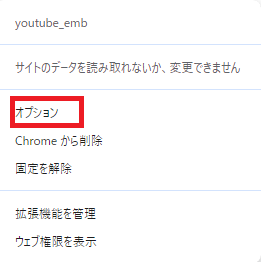
This article adds options to the extension as shown above.
For the basics of creating Chrome extensions, please refer to the following page.

implementation
Manifestation modification
Add the following settings to your manifest file.
    "permissions": ["storage"],
    "options_page": "options.html",
The Storage permission is for saving and loading settings.
Creating an options page
Create the HTML that will be displayed when a menu option is clicked. (Create it on the same page as the manifest.)
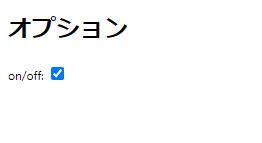
This time, I created a page with a single checkbox, as shown below.
<!DOCTYPE html>
<html>
  <head>
    <meta charset="UTF-8">
    <meta name="viewport" content="width=device-width, initial-scale=1.0">
    <title>オプション</title>
</head>
<body>
  <h1>オプション</h1>
  <div>
    <label for="onoff">on/off:</label>
    <input type="checkbox" id="onoff"  />
  </div>
  <div id="msg"></div>
  <script src="option.js"></script>
</body>
</html>
Next, create the option.js file that is being called in the HTML above. (Create it on the same page as the manifest file.)
I got an error when I put code between the HTML tags ``.
Loading an external .js file allowed the program to run without errors.
I wrote the Javascript as follows:
chrome.storage.sync.get(null, (options) => { ////設定の読み込み
    let onoff = false;
    if (options.my_plugin== undefined || options.my_plugin.onoff == undefined) {
      onoff = true;////デフォルトはTrue
    } else {
      onoff = options.my_plugin.onoff////設定から値を取得
    }
    document.getElementById("onoff").checked = onoff;/////GUIの更新
    document.getElementById('onoff').addEventListener('change', function() {////GUIが更新(クリック)されたときに呼びだされる。
      let options = {
        my_plugin: {onoff: document.getElementById("onoff").checked}////GUIの状態から保存するオブジェクトを作成
      }
      chrome.storage.sync.set(options);  /////設定をローカルに保存
    })
  });
Loading settings from other scripts in the extension
You can also load saved settings from other JavaScript files used by the extension (sample.js in the example below).
Loading is done in the same way as option.js
chrome.storage.sync.get()Get the settings
options.my_plugin.onoffYou can access the value like this.
Result
I was able to add an options page to the Chrome extension and access the settings from within the extension.
Websites I used as references


コメント