
Things I want to do
We will configure the collision detection for the physics engine (Arcade) in Phaser3.
We will use Part 10 of the Phaser 3 tutorial as an example.
Please refer to the following page for information on downloading the code and comments.

Prepare
First, refer to the following page to display the collision detection.
Hit detection settings
Set a rectangle
For objects that inherit from Phaser.Physics.Arcade.Components.Size (such as sprites)
Call setSize() and setOffset().
setSize(width, height, [center])The arguments for SetSize are as follows:
Width: Width of the hit detection area
Height: Height of the hitbox
`center`: Passing `true` sets the specified size to the center of the object. Passing `false` sets the specified size to the top-left corner of the object. Default: `true`
setOffset(x, [y])The arguments for setOffset are as follows: (These are not necessary when specifying the center of an object.)
x: x offset from the top left
y: y offset from the top left
There’s also the `setBodySize()` method, but sometimes it wouldn’t work even after creating the object in the same way.
Set a circle
For objects that inherit from Phaser.Physics.Arcade.Components.Size (such as sprites)
Call setcircle().
setCircle(radius, [offsetX], [offsetY])The arguments for setCircle are as follows: (These are not necessary when specifying the center of an object.)
Radius: The radius of the circle to be set.
offsetX: x offset from the top left
offsetY: y offset from the top left
Let’s try using Phaser3 Turtorial.
In the tutorial, the hit detection area is wide around the player’s head, as shown in the screenshot below, which feels unnatural.
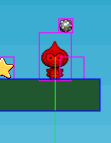
Set as a rectangle
After creating the player as shown below, call setSize(32, 24).setOffset(0, 24).
    // The player and its settings
    player = this.physics.add.sprite(100, 450, 'dude');
    player.setSize(32, 24).setOffset(0, 24);    ///追加
The collision detection area is a 32×24 rectangle (specified by setSize) that starts from the top left corner at x=0 and y=24 (specified by setOffset).

Set in a circular shape
After creating the player as shown below, call setCircle(16, 0,16).
    // The player and its settings
    player = this.physics.add.sprite(100, 450, 'dude');
    player.setCircle(16, 0,16);
The collision detection area is a rectangle with a radius of 16 (specified by the first argument) that starts from the top left corner, at x=0 and y=16 (specified by the second and third arguments).
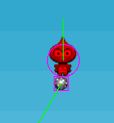
Note that the specification is by radius, not diameter.
In this case, we’ve set the circle to 32/2, which is 16, to match the image width of 32px.
Result
I was able to set up the collision detection.
Websites I used as references
コメント