
Things I want to do
When exporting from Blender as glTF 2.0, save the textures as an external file instead of a single file.
Environment
Blender:3.4.1
Format change
To display the export dialog, go to ‘File’ in the upper left corner → ‘Export’ → glTF 2.0 (.glb/.gltf).
Click the format button on the right side of the dialog box that appears.
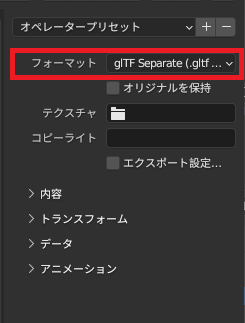
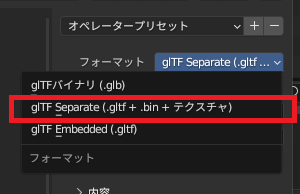
Select glTF Separate (.gltf + .bin + texture) and save.
Result
The specified filename.gltf, specified filename.bin, and texture files (image files) will be saved in the selected folder.
example)
3D.gltf
3D.bin
texture.png
merit
Since the image file is saved separately as a 3D file, it can be directly edited using paint software or similar programs.
You can also edit 3D.glt directly.

Related pages
A summary of how to load and display 3D objects created in Blender using Threejs.
コメント